How I use Obsidian for study and personal life, or. Obsidian for real people.
I wanted to make another rage-bait about Claude users. I'm a regular Obsidian user. I take notes. I organise them. I read them again. I like to spend some time tinkering with plugins and snippets to keep my vault pretty. After my fall from the clouds yesterday I wanted to clean my eyes. I looked for #Obsidian #notetaking on some social media. I thought I'd find images of pretty notes. Like the ones you get with #studygram, but digital. I was flabbergasted again when I found a million posts about second brains for Claude agents, with shiny (ugly) graphs. And when it's not an agent running some shady scam business, it's just men writing citations from the emptiest self-improvement books. It seems like the more men use the word "brain", the less they actually use one.
So for other people who need to use their human brain, I'd love to hear about your vault. Bonus points if it's pretty 🎀.
My setup
First of all, why?
I like to use Obsidian for three purposes: personal journaling, taking notes for my biology degree and project planning. I think it really changed my life for study content. For school, I used to take my notes by hand on loose-leaf pages and organise them by subject in (physical) folders. Not only I ended up with several boxes of school material (I'm an older student and a serial home-switcher), but also this method was difficult for my biomedical degree because everything interconnects. From here, I added my journaling and project notes as well, just because I like to keep everything in one place.
Disclaimer: unlike vibe-coders on Youtube, I don't think I'm a genius. I have a masters degree in arts and I'm actually studying and undergrad program in biomedical sciences as an adult learner. I need to work on it everyday or else I forget stuff and I say something stupid on my tests. I share this stuff because I'm passionate, I like to take notes and I hope other students will like this post.
Folder system
Let's see how I organised my folders. That's a general view, I'll give details about specific plugins and systems later on.
- Knowledge: everything permanent goes here. I used to name individual files so that it would be sorted by biological level and taxa. For example: molecule-cytokines-IL-1 or Insects-Diptera-Tephritidae or Plants-Bryophyta-life-cycle. Lately, I just titled my files with the name of the molecule if it's something I reference to a lot and theres no homonyms, like insulin. I also have individual notes for systems and metabolic pathways.
- Fleetings: one individual note per project. It can be ideas for my birthplan, log on my exchange with the french administration system or comparison charts for something I want to buy.
- Fleetings-ID: that's working notes for organism I identified, mostly insects. It's sorted by identification number and linked with a QGis database. That's on hold for now as I deal with pregnancy nausea and I don't really want to put my hand in the dirt anymore.
- Images and graphs: a bin for everything I need to display or link in my notes, such as images, excel files, pdfs.
- Index: automatic and/or handmade index for each subjects, such as "biochemistry" or "cellular biology". I used tags and dataview queries to make these indexs.
- Manuscripts: poetry and writing from my former life as an artist.
- Models: well. models for my notes.
- Reading notes: for times I want to take notes about a book without thinking about separating each individual infos. I don't use that often and usually never go back to them again, unless a Ctrl+F digs one out.
- Daily Notes: it's the original folder from obsidian. I open a daily note every day, mostly to log what I worked on, scribble some questions or ideas. I am writing this post on a daily note. I have one giant note at the top for more personal journaling, that I like to build like an infinite scroll. It makes sense because it holds my anxiety-induced logorrhoea from 2021 to now, which are the same problems again and again and again.
- Unsorted at the bottom are a table for my study notes, a Kanban board and a Homepage canvas I never use.
Some stuff I really like about Obsidian
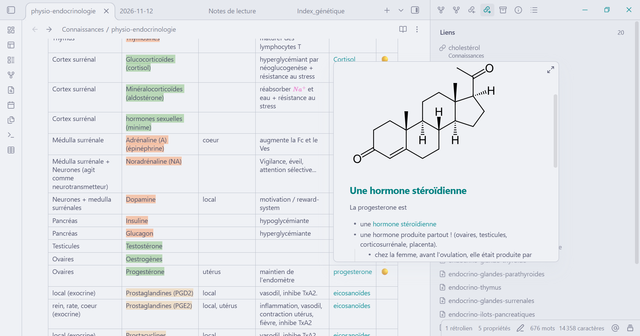
Linking metabolic pathways and systems to individual molecules
I get to make a note about a specific system, color code everything I need to remember and create links to specific notes with the drawing of the molecule, which links further to other systems and pathways, as well as notes about its chemical class or properties.
Tags and indexing
Each note in the Knowledge section gets a header with tags, date of the class if I got one, last time I studied it and sometimes an Index number.
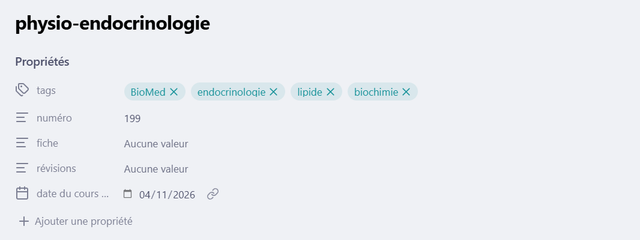
This way, I can keep an automatic index for all my notes about biochem, or another index for all my notes about microbiology, or, idk, insect stuff. These indexes pull the notes with a dataview query, and I can organise them if needed. Of course I didn't write this query, by the way, I'm a moron, I think I got it from a blog somewhere.
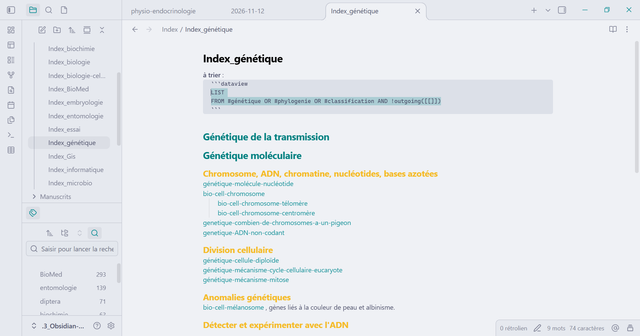
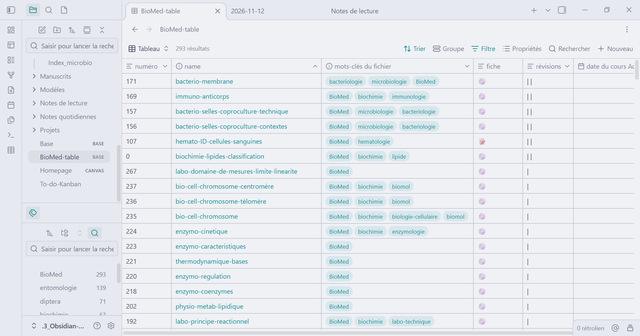
Finally, I made another Index by hand for my current degree. This index follows the syllabus and each note gets a number (that's the line "numéro" in the properties). This way, I can track what I need to focus on for each final exam and I get an overview at what I'll need to know by the end of the year. I also have a table with all these notes, this way I can see how many notes I've made, how many times I've reviewed them, I can pull up all my notes from a specific class or see which notes are made on paper and need to be scanned (identified with the emoji 📝). These notes are all created using a simple model with the right properties in the header, a top section where I copy and paste the expectations of the syllabus and a reference section at the bottom.
My vault connects to Zotero for reference papers
My favorite feature is that I can link to articles and books referenced in my Zotero. I type a citation key and it makes a connection with general infos about the resource, a link to Zotero or a link to open the article itself. I think a plugin can import actual citations from Zotero as well but this feature is broken on my system and I never fixed it because 1. I don't need it, 2. I'm a moron. I tried a few plugins for Zotero integration in Obsidian, the one I currently use is Pandoc Reference List and it works perfectly.

Ok that's all people. Real humans using Obsidian, I'd love to see your vault!